The era of e-commerce is undergoing its most significant transformation since the invention of the search engine. Consumers are no longer relying solely on manually browsing catalogs, filtering products, and reading reviews. Instead, they are turning to autonomous AI agents—such as ChatGPT, Microsoft Copilot, Google Gemini, and the Shop App—to perform searches, compare options, and make purchases on their behalf.
This shift is known as Agentic Commerce. To help merchants capitalize on this transition, Shopify has launched two key tools: the Agentic Storefronts sales channel (along with the Shopify Catalog) and the Shopify Knowledge Base app. In this guide, we will break down exactly how these systems work, how to set them up step-by-step, and how to optimize your catalog for Generative Engine Optimization (GEO).
If you want professional assistance preparing your storefront catalog and business settings for AI discovery and search systems, check out our new SEO & AI Search Optimization Service.
Traditional SEO vs. Generative Engine Optimization (GEO)
Optimizing for AI discovery (GEO) is fundamentally different from traditional SEO. While search engines look for keyword frequency and backlinks, AI agents synthesize large amounts of text to answer user queries factually and contextually.
| Optimization Dimension | Traditional SEO | Generative Engine Optimization (GEO) |
|---|---|---|
| Primary Target | Search engine crawler algorithms (Google, Bing) | Large Language Models (LLMs) & autonomous shopping agents |
| Ranking Metrics | Keywords, domain authority, backlink profile, page load speed | Information density, factual accuracy, structured metadata, policy presence |
| Data Source | HTML source code, meta tags, schema markup | Shopify Catalog feed, Knowledge Base FAQs, machine-readable store policies |
| User Experience | Visual browsing on storefront pages | Conversational responses, instant in-chat checkouts, direct agent recommendations |
Understanding Shopify's Agentic Channels
Shopify's Agentic Storefronts allow you to sync your products to a central directory called the Shopify Catalog. AI search systems and platforms tap into this catalog to source product availability, pricing, and structural details.
| AI Platform / Channel | Supported Actions | How It Accesses Your Store |
|---|---|---|
| ChatGPT | Product discovery, recommendations, links to buy | Queries the Shopify Catalog for products synced by the merchant. |
| Microsoft Copilot | Conversational search, price comparisons, product descriptions | Pulls structured product data directly from indexed catalog streams. |
| Shop App | Autonomous browsing, customized suggestions, direct checkouts | Natively integrated with Shopify; reads real-time store profiles. |
| Other Channels | Voice searches, external web assistant integrations | Syndicated via the Agentic Storefront interface to authorized crawlers. |
Step-by-Step Setup Checklist for Agentic Commerce
Follow this step-by-step checklist to configure your Shopify backend for maximum visibility on AI channels.
1. Activate Agentic Storefronts
Navigate to your Shopify admin dashboard. Under your sales channels, verify that Agentic Storefronts is active. This channel serves as your main control center, letting you monitor earnings generated by AI-led visits, verify product synchronization status, and toggle permissions for specific AI assistants.
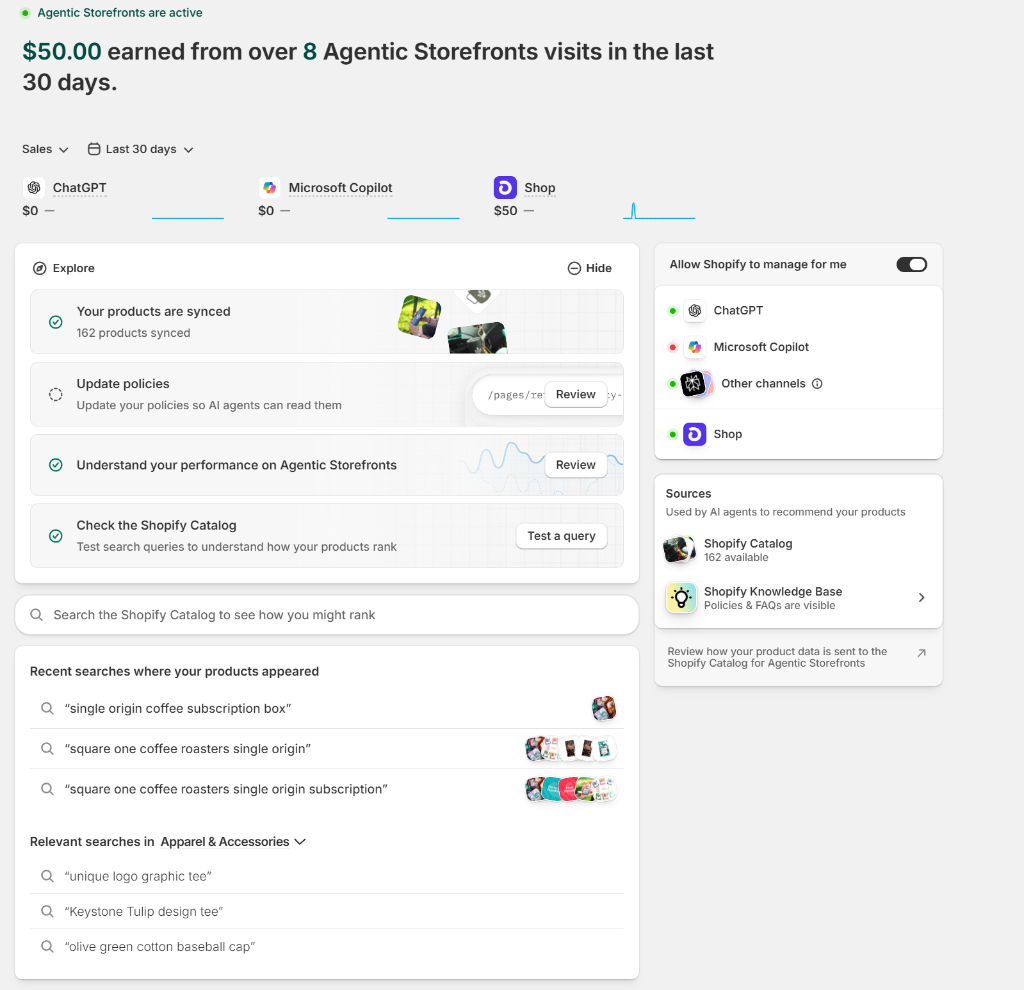
Figure 1: Shopify Agentic Storefronts Admin Panel with channel permissions and performance statistics.
-
[✓]
Verify Catalog Sync: Confirm that your products (e.g. all available active items) are fully synced to the Shopify Catalog.
-
[✓]
Enable Permissions: Toggle the "Allow Shopify to manage for me" option, or manually select ChatGPT, Microsoft Copilot, and other channels.
-
[✓]
Confirm Sources: Ensure both the "Shopify Catalog" and the "Shopify Knowledge Base" are connected as active query sources.
2. Audit and Update Store Policies
AI shopping agents prioritize safety and credibility. When evaluating whether to recommend a store to a buyer, agents will scan for standard legal policies. If critical policies are missing (such as return/refund terms or shipping rules), AI agents may penalize your store's rank or refuse to recommend your products altogether.
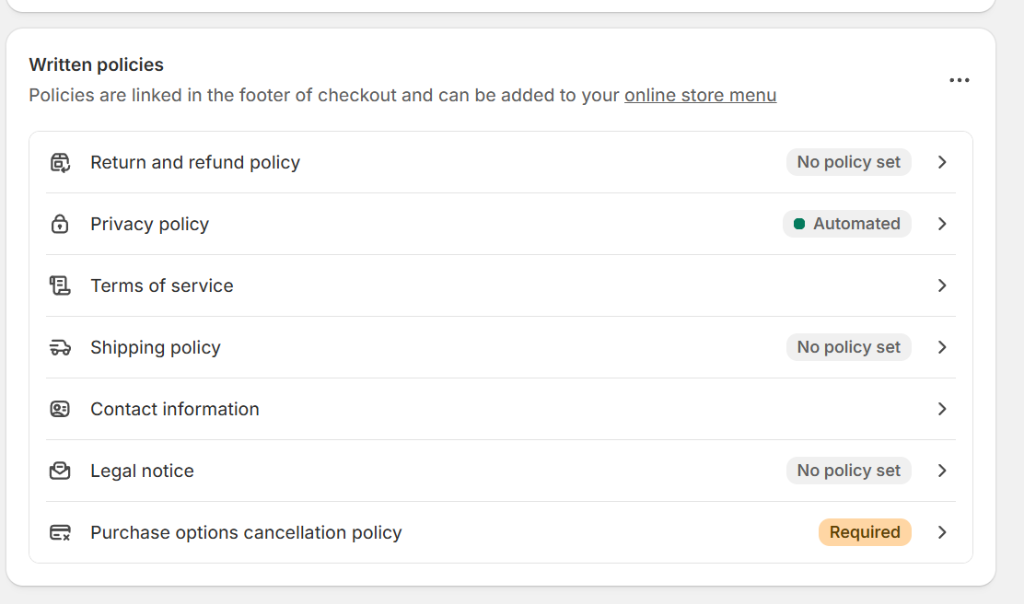
Figure 2: Reviewing store policy completeness in Shopify settings. Missing policies lower AI trust scores.
-
[✓]
Set Return & Refund Policy: Clearly write return timelines and refund conditions. Do not leave this empty.
-
[✓]
Define Shipping Policy: State delivery carriers, processing times, and domestic/international rates.
-
[✓]
Automate Privacy Policy: Generate a compliant privacy policy in your Shopify settings (Settings > Policies).
3. Audit Product Listings for AI Search Matching
Shopify provides tools to search the Shopify Catalog to test how your products rank for specific shopper search terms. If your listing has low information completeness (such as short descriptions, few image angles, or zero reviews), your discovery rank will suffer.
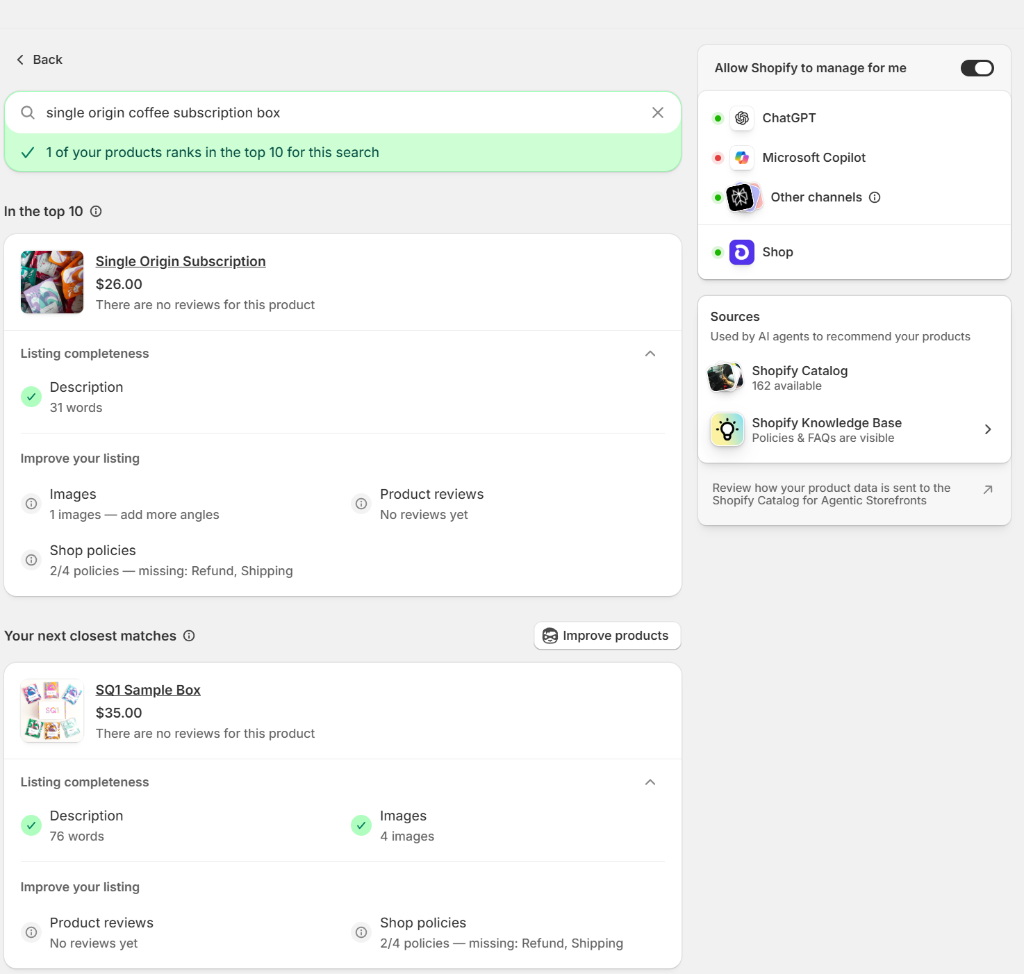
Figure 3: Testing product search rankings. Enhancing descriptions, images, and reviews secures top positions.
-
[✓]
Expand Product Descriptions: Aim for comprehensive descriptions that outline exact use cases, materials, and benefits.
-
[✓]
Add Multi-Angle Images: Ensure product listings contain multiple high-resolution photos displaying key features.
-
[✓]
Collect Reviews: Gather verified customer feedback. Products with strong reviews are recommended first by LLMs.
4. Leverage AI-Powered Auditing Tools
You can use Shopify Sidekick (the built-in commerce assistant) to automatically analyze your catalog's discoverability. Sidekick scans your product metadata against SEO and GEO best practices, pointing out exactly which policies are missing and suggesting specific enhancements to titles and descriptions.
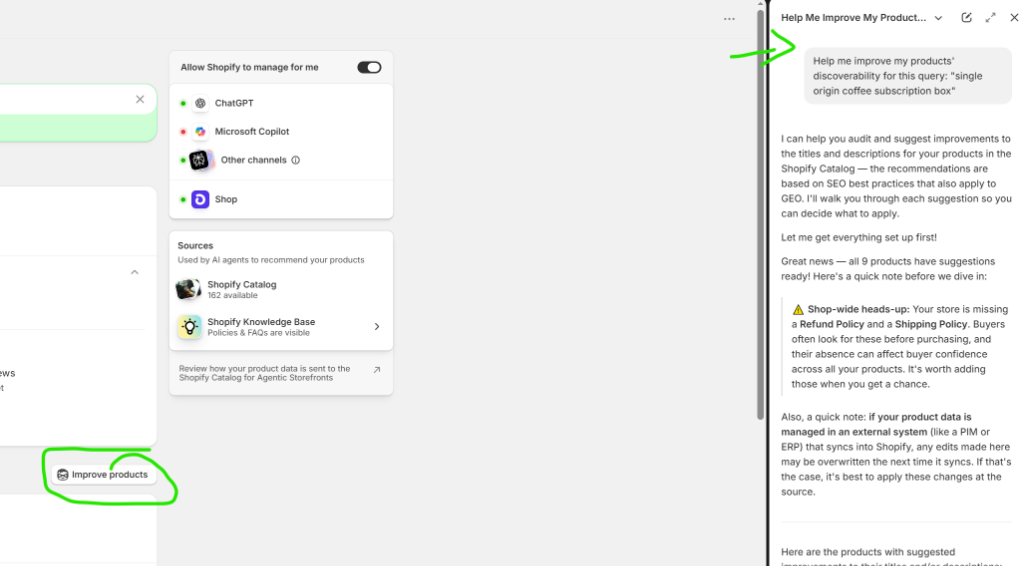
Figure 4: Using Shopify Sidekick to audit listing discoverability and apply localized optimization recommendations.
-
[✓]
Audit discoverability via Sidekick: Ask: "Help me improve my products' discoverability for this query: [Your Focus Keyword]".
-
[✓]
Review ERP/PIM Sync Rules: If editing titles in Shopify, ensure your PIM/ERP integrations don't overwrite these updates during subsequent syncs.
Frequently Asked Questions (FAQ)
Here are twenty of the most common questions merchants ask when launching and optimizing Shopify Agentic Commerce channels.
1. What is Agentic Commerce?
Agentic commerce refers to an emerging shopping paradigm where autonomous AI software agents (like ChatGPT or Copilot) perform research, compare pricing, review store trust policies, and complete transaction actions on behalf of human buyers.
2. How does the Shopify Knowledge Base app help AI discovery?
The app feeds a machine-readable, structured fact list about your business policies (shipping, returns, locations) directly to search crawlers and AI search platforms. This keeps answers accurate and ensures AI systems trust your storefront.
3. Does the Shopify Knowledge Base app change my storefront design?
No. The Shopify Knowledge Base app is built solely as an intelligence data feed layer for AI agents. It does not output any visible elements or custom styling on your public storefront pages.
4. What is Generative Engine Optimization (GEO)?
GEO is the practice of structuring store copy, data feeds, and policies so that generative AI models (LLMs) can easily read, parse, and choose to recommend your items in conversational search responses.
5. Why are store policies so critical for AI agent recommendations?
AI assistants evaluate transaction risks before proposing products. Missing shipping rules or refund policies flags the site as high-risk, causing the agent to filter your products out of top recommendations.
6. Can AI agents complete purchases directly inside conversational screens?
Yes, on select supported channels. When "direct checkout" is enabled, customers can utilize tokenized payment gateways to finalize purchases natively within the AI chat application.
7. What is the Shopify Catalog?
The Shopify Catalog is a unified index database of your store’s product descriptions, pricing, media, and inventory status. AI channels query this catalog to fetch real-time merchant product information.
8. How do I know if my products are ranking in AI searches?
Use the "Check the Shopify Catalog" feature in the Agentic Storefronts dashboard. Enter a test search query to see if your items rank in the top 10 search results and identify listing optimizations.
9. What is the Shopify Agentic Plan?
The Agentic Plan allows external (non-Shopify) merchants to list their inventory in the Shopify Catalog. This syndicates their products across AI discovery channels while routing final sales back to their external store URLs.
10. How can I improve my product's visibility in search queries?
Audit the "Listing completeness" score. Write longer, detailed product descriptions (aiming for over 75 words), upload multiple product image angles, collect reviews, and resolve missing shop policies.
11. What is the Query Log in the Shopify Knowledge Base app?
The Query Log tracks real customer questions asked to AI systems regarding your shop. Use this log to identify content gaps and add custom FAQs addressing common concerns.
12. Can I use the Knowledge Base app to replace my customer-facing FAQ page?
No. The Knowledge Base app is built specifically to output machine-readable schema feeds. You still need a standard, customer-facing HTML FAQ section for human visitors on your storefront.
13. Does Shopify charge extra fees for AI-generated orders?
Standard payment gateway processing fees apply to orders captured through Agentic Storefront checkouts. Be sure to check your billing dashboard for updates on native checkout channels.
14. What happens to my custom product description edits during PIM/ERP syncs?
If your product descriptions are managed in external PIM/ERP software, direct edits made in the Shopify Catalog dashboard might get overwritten. Make description optimizations in your source system first.
15. Which AI platforms are natively supported by Agentic Storefronts?
Shopify supports integrations with ChatGPT, Microsoft Copilot, and the Shop App, alongside general syndication networks routing product feeds to various web assistants.
16. Are product reviews necessary for ranking in the Shopify Catalog?
While reviews are not strictly mandatory to be indexed, they are a powerful ranking signal. AI agents frequently recommend products with positive reviews over those without reviews.
17. Can I select which products are excluded from AI agent discovery?
Yes. You can manage product availability by adjusting channel visibility settings directly inside your Shopify Admin product listings, excluding specific collections or items.
18. Is Shopify Knowledge Base app free?
Yes, the official Shopify Knowledge Base app is a free tool provided directly by Shopify to ensure merchants can optimize their business representation on modern AI networks.
19. How long does it take for changes to reflect in AI search engines?
It depends on the platform. Shopify Catalog updates sync relative to the respective platform's ingest schedules, typically ranging from a few hours to a day.
20. How do I start using Shopify Sidekick for GEO audits?
Access Sidekick via the AI assistant panel in your Shopify admin. Ask Sidekick to audit listing discoverability, and follow the localized step-by-step suggestions to improve rank.